Fortinet Firewalls Are Getting Hacked Even After Patching CVE-2025-59718 – What UK Businesses Need To Do Now
Fortinet admins report compromises on patched FortiGate devices. CVE-2025-59718 bypass actively exploited. What UK businesses must do now to secure network infrastructure
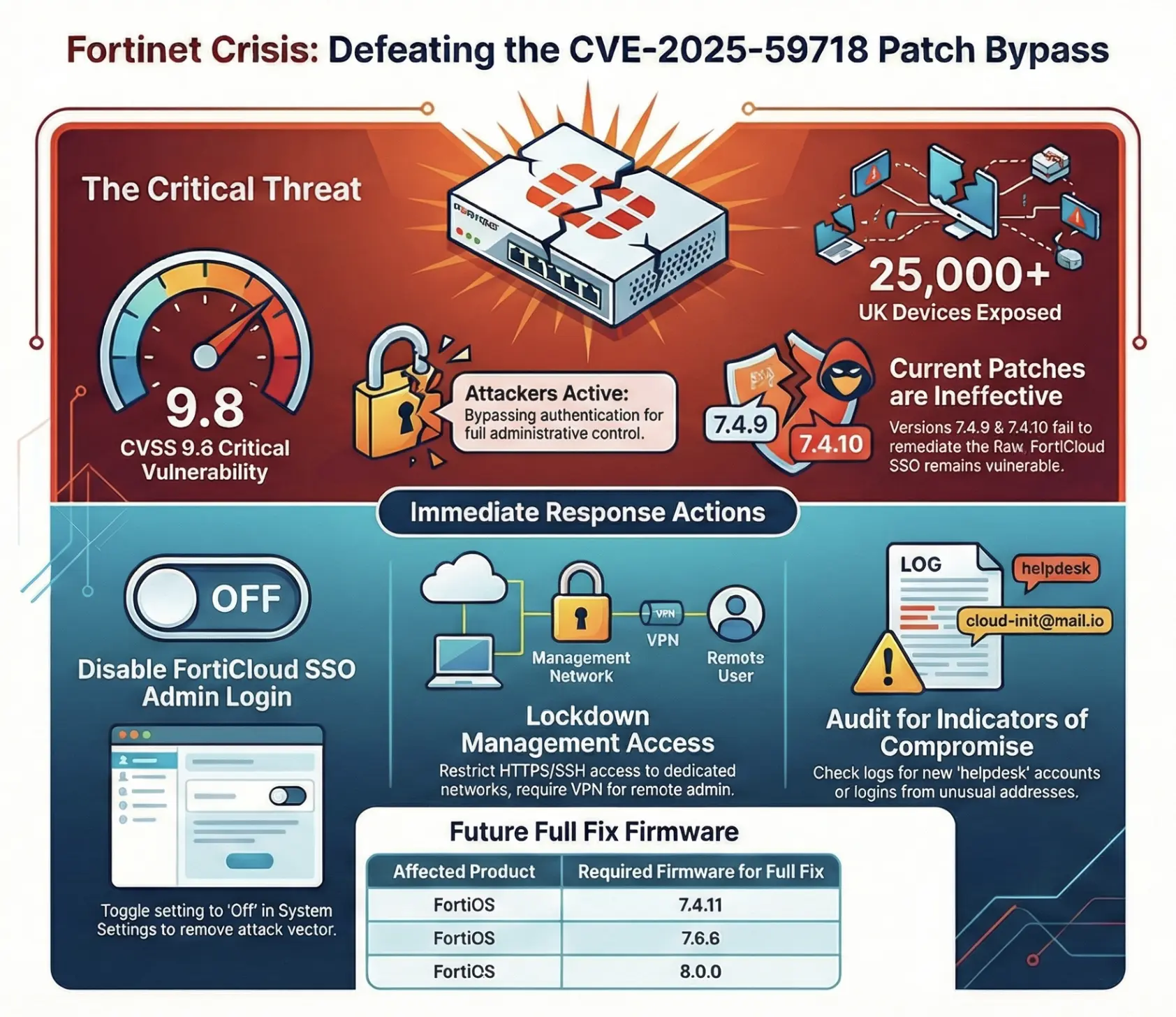
Fortinet customers are reporting that FortiGate firewalls already updated to FortiOS 7.4.9 and 7.4.10 are still being compromised. Attackers are exploiting a patch bypass of critical authentication vulnerability CVE-2025-59718, gaining full administrative control even on supposedly "patched" systems.
If your business uses Fortinet firewalls, this is not a routine security update. This is an active incident requiring immediate action.
Current status: Patches released (7.4.9, 7.4.10) are NOT fully effective
Exploitation: Active in the wild; CISA has added this to Known Exploited Vulnerabilities
UK business impact: Over 25,000 Fortinet devices had FortiCloud SSO enabled globally in mid-December 2025
How The Attack Works
The vulnerability stems from improper verification of cryptographic signatures in SAML messages used by FortiCloud single sign-on (SSO). When FortiCloud SSO administrative login is enabled, an unauthenticated attacker can craft a malicious SAML response that grants admin access without valid credentials.
In plain English: your firewall's management interface becomes publicly accessible to anyone who knows how to exploit this flaw.
What attackers are doing:
Exploiting the SSO authentication bypass to log in as administrator
Creating new local admin accounts (commonly named "helpdesk" or similar)
Establishing persistent access to the firewall
Potentially modifying firewall rules, VPN configurations, and routing
This isn't theoretical. UK organisations and international firms are reporting compromises on devices running the supposedly fixed firmware versions.
Why "Patched" Devices Are Still At Risk
Here's the critical part: administrators report successful attacks on FortiGate appliances that had already been upgraded to FortiOS 7.4.9 and 7.4.10. Fortinet has reportedly confirmed the vulnerability persists in version 7.4.10.
This is what security professionals call a patch bypass. The underlying logic flaw in the authentication flow remains exploitable under certain conditions, even after the first round of patches.
Fortinet is preparing fully remediated versions:
FortiOS 7.4.11
FortiOS 7.6.6
FortiOS 8.0.0
Until these versions are released and deployed, organisations with FortiCloud SSO enabled remain at risk.
Who Is Affected
Your organisation is potentially vulnerable if:
You're using FortiGate, FortiProxy, FortiWeb, or FortiSwitchManager
You have FortiCloud SSO administrative login enabled
Your management interface is accessible from the internet (even if you think it's restricted)
Important detail: FortiCloud SSO admin login is often automatically enabled during FortiCare registration unless an administrator explicitly opts out. Many organisations don't realise this feature is active.
Even if you're not using FortiCloud SSO for day-to-day operations, if it's enabled in the configuration, you're exposed.
Immediate Actions For IT Administrators
1. Check If FortiCloud SSO Admin Login Is Enabled
Via GUI:
Log into FortiGate web interface
Navigate to System → Settings
Look for "Allow administrative login using FortiCloud SSO"
Via CLI:
show system global | grep admin-forticloud-sso-login
If this shows enable, you need to act immediately.
2. Disable FortiCloud SSO Admin Login (If Not Required)
Unless you absolutely need FortiCloud SSO for administrator access, turn it off right now.
Via GUI:
System → Settings
Switch "Allow administrative login using FortiCloud SSO" to Off
Apply changes
Via CLI:
config system global
set admin-forticloud-sso-login disable
end
This single configuration change removes the attack vector entirely.
3. Restrict Management Access
Your firewall's management interface should never be accessible from the open internet.
Implement these controls immediately:
Limit HTTPS and SSH admin access to dedicated management networks
Require VPN connection for remote management
Configure IP allowlists for management interfaces
Disable management access from WAN interfaces
If you're not certain how your management access is configured, assume it's exposed and audit it now.
4. Review Logs For Signs Of Compromise
Look for:
Unexpected FortiCloud SSO logins (particularly from unusual email addresses like cloud-init@mail.io)
New local administrator accounts that you didn't create
Administrative actions during unusual hours
Configuration changes to firewall rules, VPN settings, or admin accounts
Where to check:
System → Log & Report → Event Logs
Filter for "Admin" events
Export logs to your SIEM if you have one
If you don't have centralised logging, set it up. You can't investigate what you haven't recorded.
5. If You Find Evidence Of Compromise
If you discover suspicious activity, assume full device compromise.
Required response steps:
Isolate the device from production (if operationally feasible)
Rotate all credentials:
Local administrator accounts
FortiCloud SSO accounts
API tokens
VPN user credentials
Any service accounts used by the firewall
Factory reset and rebuild:
Backup your current configuration (for forensic analysis, not for restoration)
Factory reset the device
Restore from a known-good configuration backup from before the compromise
Apply the latest available firmware
Document everything for audit and insurance purposes
6. Plan Emergency Maintenance For Final Patches
When Fortinet releases FortiOS 7.4.11, 7.6.6, and 8.0.0, you need to schedule emergency change windows to apply them immediately.
Don't wait for your normal monthly patching cycle. This is a critical, actively exploited vulnerability with proof of concept code in circulation.
7. For Managed Service Providers
If you manage Fortinet infrastructure for multiple clients:
Create a standard incident response runbook:
Inventory all FortiGate, FortiProxy, FortiWeb, and FortiSwitchManager deployments
Check FortiCloud SSO status on each device
Disable SSO where not required
Schedule emergency maintenance windows with all affected clients
Document configuration changes and communication
Monitor for IOCs across your entire managed estate
Your clients are relying on you to protect them. Proactive communication and rapid response separates professional MSPs from order-takers.
Why This Matters For Your Business
1. Active Exploitation Is Documented
This isn't a "maybe someone could exploit this" scenario. CISA (US Cybersecurity and Infrastructure Security Agency) has added CVE-2025-59718 to their Known Exploited Vulnerabilities catalogue and ordered federal agencies to remediate quickly.
UK organisations face similar scrutiny from:
Cyber insurers reviewing claims
ICO in the event of a data breach
Industry regulators (FCA, CQC, etc.)
Audit requirements (ISO 27001, Cyber Essentials Plus)
Failing to act on known, actively exploited vulnerabilities becomes increasingly difficult to justify.
2. Firewalls Are Single Points Of Failure
Your firewall sits at the boundary of your network. Compromising it gives an attacker:
Visibility into all traffic passing through your network
Ability to modify firewall rules to allow additional access
Control over VPN configurations and remote access
Potential access to internal network segments
A compromised firewall isn't just a security incident. It's a potential business continuity crisis.
3. Cloud SSO Creates New Attack Surfaces
This vulnerability highlights a broader risk: cloud identity integrations on security appliances must be treated as high-risk components, not convenience features.
Many organisations enable SSO for "ease of management" without considering:
The additional attack surface it creates
The authentication dependencies it introduces
The residual risk if SSO providers have vulnerabilities
The compliance implications of cloud-based authentication
Convenience and security often compete. Make conscious trade-offs, don't accept defaults.
You're not paying for someone to install updates. You're paying for expertise, vigilance, and rapid response when threats emerge.
What Stabilise Does Differently
We don't just patch firewalls. We architect network security with the assumption that any single control can fail.
Our approach to infrastructure security:
1. Configuration Audits
We review your security appliances (Fortinet, Cisco, UniFi, and others) against CIS benchmarks and vendor hardening guides. This often reveals that features like FortiCloud SSO are enabled unnecessarily, creating avoidable risk.
2. Management Plane Hardening
Your firewall's admin interface gets the same scrutiny as your DMZ. We implement:
Dedicated management networks
Jump host architecture
IP allowlisting
Session recording and monitoring
Emergency access procedures that don't require internet exposure
3. Layered Monitoring
We don't assume firewalls are invulnerable. Our monitoring watches for:
Configuration changes on security appliances
New administrative accounts
Unusual authentication patterns
Changes to firewall rules or routing
Traffic anomalies that could indicate compromise
4. Vendor-Agnostic Security Assessment
We're not Fortinet partners, Cisco partners, or Palo Alto partners. We assess your security infrastructure objectively and recommend changes based on your risk profile, not vendor relationships.
If your Fortinet firewall is creating more risk than it mitigates, we tell you.
How To Get Your Fortinet Infrastructure Audited
We're offering UK organisations a Fortinet Firewall Health Check this month:
What we assess:
FortiCloud SSO configuration and exposure
Management interface accessibility audit
Firmware version review against current vulnerabilities
Admin account and authentication review
Logging and monitoring configuration
Compliance with Cyber Essentials Plus requirements
What you receive:
Written report of findings
Prioritised remediation plan
Configuration hardening recommendations
Estimated risk reduction from recommended changes
This isn't a sales call disguised as an audit. We document what we find, explain the risks, and provide clear remediation steps whether or not you engage us for implementation.
Book your audit:Contact us or email security@stabilise.io with "Fortinet Audit" in the subject line.
Frequently Asked Questions
Do I need to disable FortiCloud SSO if I'm already on the latest firmware?
If you're running FortiOS 7.4.9 or 7.4.10, yes. Field reports confirm these versions remain vulnerable to the patch bypass. Disable FortiCloud SSO admin login unless you have a specific operational requirement for it.
What if I need FortiCloud SSO for my remote administrators?
Consider alternative approaches:
VPN + local authentication
Jump host with MFA
Dedicated management VPN tunnel
If you must use FortiCloud SSO, implement compensating controls: IP allowlisting, dedicated management VLAN, enhanced monitoring, and immediate upgrade to fixed versions when available.
How do I know if my firewall has already been compromised?
Review authentication logs for:
Unrecognised SSO login events
New administrator accounts you didn't create
Configuration changes during off-hours
Multiple failed login attempts followed by successful access
If your logs don't go back far enough, that's a separate problem. Implement 90-day log retention minimum.
Can I just disable internet access to the management interface instead of disabling SSO?
Technically yes, but it's not sufficient. The vulnerability exists in the SSO authentication mechanism. If an attacker gains access to your network through other means (phishing, compromised VPN, supplier access), they could still exploit it internally.
Defence in depth: disable unnecessary features AND restrict management access.
What's the difference between cyber security services and just having a firewall?
A firewall is a tool. Cyber security services involve:
Selecting the right tools for your risk profile
Configuring them according to security best practices
Monitoring them continuously for issues
Responding rapidly when vulnerabilities emerge
Testing and validating that controls work as intended
You wouldn't buy a defibrillator and consider yourself protected against heart attacks. The tool matters, but expertise in using it matters more.
Should we consider replacing Fortinet entirely?
Not necessarily. Every firewall vendor has vulnerabilities at some point. The question is:
How quickly do they respond?
How transparent are they about issues?
Do you have the expertise to manage their platform securely?
Fortinet makes solid products, but this incident highlights the importance of configuration management and not just relying on vendor defaults.
What does this mean for Cyber Essentials Plus compliance?
Cyber Essentials Plus requires that security patches are applied promptly. With CVE-2025-59718:
If you've disabled FortiCloud SSO, you've mitigated the vulnerability
You must upgrade to fully patched versions when available
Document your actions (what you did, when, and why)
UK assessors will expect evidence you responded to critical vulnerabilities within days, not weeks.
How often should we be reviewing firewall configurations?
Minimum:
Quarterly configuration review against vendor hardening guides
After any significant change to network or security infrastructure
When vendor security advisories recommend configuration changes
During annual penetration testing and security audits
If you have a managed cyber security services provider, they should be doing this continuously.
Summary: What To Do Today
If you're responsible for Fortinet infrastructure in a UK business:
Check FortiCloud SSO status on all devices (5 minutes per device)
Disable it if you don't specifically need it (2 minutes per device)
Audit management interface access from the internet (30 minutes)
Review authentication logs for suspicious activity (1 hour)
Schedule emergency maintenance for when 7.4.11/7.6.6/8.0.0 release (now)
Document everything you find and fix (ongoing)
If you don't have the expertise or resources to do this quickly, that's what professional IT support services are for.
This is the difference between reading about security incidents in the news and being in the news about a security incident.
About Stabilise
We're technology advisors who specialise in network security and infrastructure for London businesses. We manage security appliances across Fortinet, Cisco, UniFi, and other platforms, with a focus on configuration hardening and defence-in-depth.
Unlike commodity IT support companies, we employ certified security engineers who understand both the technical details of vulnerabilities like CVE-2025-59718 and the business impact of getting security decisions wrong.
What makes us different:
We audit security configurations proactively, not just when incidents occur
We implement layered security controls, not just perimeter firewalls
We monitor for compromise, not just availability
We're transparent about costs, capabilities, and limitations
If you're a London business looking for cyber security management services that go beyond "patch and pray," let's talk.
Last updated: 22 January 2026 Classification: Public security advisory Sharing: You may share this article with colleagues and industry contacts
Sources:
BleepingComputer security reporting
VulnCheck technical analysis
Arctic Wolf vulnerability research
Fortinet security advisories
CISA Known Exploited Vulnerabilities catalogue
Field reports from UK Fortinet administrators
Need immediate assistance with Fortinet firewall security? Email security@stabilise.io or call our security team on +44 203 355 7522
Subscribe to our newsletter
Honest insights, no sales pitches. We share what we've learned helping London businesses succeed with Apple technology.